

Table of Contents
- What Does DTF Printer Ink Starvation Look Like?
- Common Causes of Ink Starvation in DTF Printers
- Understanding DTF White Ink Circulation Issues
- How to Clean DTF Printheads to Restore Flow
- Step-by-Step DTF Printer Damper Replacement
- Preventive Maintenance to Avoid Ink Starvation
- Frequently Asked Questions
Last Updated: 6 September 2026
DTF printer ink starvation is the failure of the printhead to receive a consistent, uninterrupted supply of ink, resulting in faded output, missing lines, or banding across your prints. When this issue strikes mid-production, it wrecks transfers and eats into your profit margins. At Laserprints, we provide expert repair and maintenance for DTF print engines, and ink delivery faults are among the common reasons operators seek support. Below, we’ll show you exactly how to diagnose the root cause, restore full flow, and prevent it from returning.
What Does DTF Printer Ink Starvation Look Like?
Ink starvation produces a distinct set of visual symptoms that differ from a genuinely clogged nozzle. You will typically see fine white lines or gaps appearing in solid colour areas, particularly in high-density prints. The output may also look washed out or lighter than expected, even when your colour profile hasn’t changed.
A key diagnostic clue is that the issue often appears and disappears. If you pause printing for a few minutes and run a nozzle check, the pattern may look perfect. Once you resume high-volume production, the white lines return. This intermittent behaviour points to a supply problem rather than a permanent blockage, because the printhead is consuming ink faster than the delivery system can replenish it.
Common Causes of Ink Starvation in DTF Printers
Several faults can restrict ink flow to the printhead. The most frequent culprits are failing dampers, trapped air, and degraded ink circulation. Each requires a different fix, so accurate diagnosis saves you hours of downtime.
Clogged or Failing Ink Dampers
The ink damper sits between the ink line and the printhead, regulating pressure and filtering contaminants. Over time, the internal mesh screen can clog with pigment particles, especially when using white DTF ink, which is denser than CMYK formulations (peer-reviewed research). A restricted damper starves the printhead of ink even when the cartridge or bulk system is full.
You can test a suspect damper by observing ink flow during a cleaning cycle. If the damper chamber does not visibly fill or empty as the pump cycles, it is likely blocked or the internal membrane has failed. Damper failure is a wear-and-tear issue, and replacement is the only reliable cure.
Air Bubbles Trapped in the Ink Lines
Air introduced into the ink delivery system creates a compressible pocket that interrupts the steady pressure the printhead needs. This typically happens after changing ink cartridges, replacing a damper, or letting the ink level run too low. The printhead draws a mixture of air and ink, producing the same starvation symptoms as a blockage.
Purge the air by running several powerful cleaning cycles from your printer’s maintenance menu. If the issue persists, you may need to use a syringe to pull ink through the line manually until all air is evacuated. Always prime the system fully after any component swap to prevent this problem.
Understanding DTF White Ink Circulation Issues
White ink is the most demanding fluid in a DTF system because its titanium dioxide pigment particles are heavy and settle quickly (pubs.acs.org). Most professional DTF printers use a circulation system that continuously recirculates white ink to keep pigment suspended. If this circulation loop fails, pigment drops out of suspension and settles in the lines, dampers, and printhead nozzles.
A common mistake is leaving the printer idle overnight without running the automatic agitation or circulation cycle. Many operators find that white ink starvation appears first thing in the morning, directly after this idle period. The fix is to ensure your printer’s circulation timer is enabled, and to run a manual stir cycle before starting production if the machine has been off for more than a few hours.
How to Clean DTF Printheads to Restore Flow
If you confirm the dampers are passing ink and no air is trapped, the blockage likely sits inside the printhead nozzles themselves. Start with the printer’s built-in cleaning function, running one or two cycles rather than an aggressive sequence, which wastes ink and stresses the head.
For stubborn cases, remove the printhead and soak the nozzle plate in a compatible cleaning solution. Use a shallow tray so the fluid reaches the nozzles without submerging the electrical contacts. Leave it for 15 to 30 minutes, then gently blot the nozzle plate with a lint-free cloth (epson.com). Never use cotton buds or abrasive materials, as these can scratch the delicate face of the printhead and cause permanent damage.
Step-by-Step DTF Printer Damper Replacement
Replacing a faulty damper is a straightforward job that resolves many ink starvation cases. You will need a replacement damper matched to your printhead, a lint-free cloth, and protective gloves to avoid introducing oils or dust into the system.
- Power off the printer and disconnect it from the mains supply.
- Open the front cover and move the carriage to the accessible service position.
- Identify the damper feeding the affected colour channel.
- Disconnect the ink line from the top of the damper, then release the clip or screw securing the damper to the printhead.
- Remove the old damper and inspect the printhead inlet for dried ink or debris.
- Fit the new damper, ensuring a firm, airtight seal on the printhead port.
- Reconnect the ink line and run a priming or cleaning cycle to purge air from the new component.
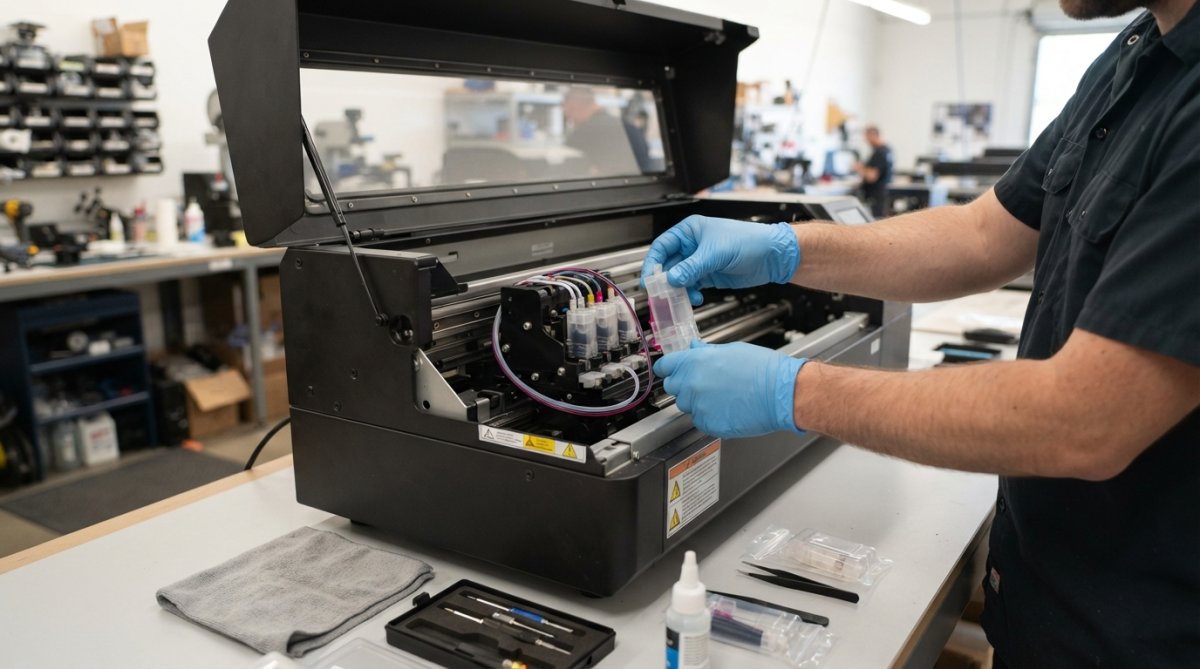
When sourcing replacements, match the damper exactly to your printhead model. For Epson XP600 systems using a CMWWYK configuration, the XP600 DTF ink damper from Laserprints is the correct part, while I3200 systems require their own specific damper. Using the wrong damper can restrict flow or cause leaks, recreating the starvation problem you are trying to fix.

Preventive Maintenance to Avoid Ink Starvation
A structured maintenance routine is the most effective way to prevent DTF printer ink starvation from interrupting your production schedule. The goal is to keep pigment suspended, lines primed, and filtration components fresh before they fail.
| Maintenance Task | Recommended Frequency | Purpose |
|---|---|---|
| Run white ink circulation cycle | Daily, before production | Keeps pigment suspended in lines |
| Nozzle check and test print | Daily, at start of shift | Catches early flow issues |
| Inspect dampers for blockages | Monthly | Identifies failing filtration parts |
| Replace dampers | Every 6-12 months | Prevents flow restriction failures |
| Full line purge and clean | Quarterly | Removes settled pigment and biofilm |
Store spare dampers and printheads in sealed bags to keep them free of dust. Monitor your ink usage patterns; if you notice a gradual decline in print density, investigate the supply path before the issue becomes acute. For businesses running multiple DTF or UV engines, having a stock of critical spares on hand is often the difference between a 20-minute fix and days of lost output. Laserprints supplies replacement dampers for XP600, I3200, and R1390 systems, along with expert repair and maintenance to keep your equipment running at peak performance.
Frequently Asked Questions
What are the primary signs of ink starvation in DTF printing?
The most obvious sign is faded or missing colours in printed output, often appearing as horizontal white lines or bands across the print. You may also see the printhead firing inconsistently, with some nozzles dropping out completely. In DTF printing, this is often more visible in white ink layers, which can look patchy or translucent. If you notice these symptoms, check your ink levels, dampers, and printhead health before continuing production.
Is ink starvation the same as a printhead clog?
No, they are different problems, though they share symptoms. Ink starvation means the printhead is not receiving enough ink to fire correctly, often due to a blocked damper, an air lock in the lines, or low ink levels. A printhead clog is a physical blockage inside the nozzle itself. Knowing the difference matters: flushing a printhead will not fix a blocked damper, and replacing a damper will not clear a clogged nozzle. Diagnose the cause before replacing parts.
How often should I perform a maintenance cycle to prevent ink starvation?
For a DTF printer in daily production, run a nozzle check at the start of every shift and perform a light cleaning cycle if you see any missing nozzles. A deeper maintenance cycle is usually only needed when a nozzle check shows persistent issues. You should also replace ink dampers proactively every 6 to 12 months, depending on your print volume, as they are a wear item that filters ink and can become clogged over time.
Ink starvation is frustrating because it mimics other faults, but the root cause is almost always a supply issue you can resolve methodically. Check your dampers, purge trapped air, and keep white ink circulating to maintain consistent, high-quality transfers. When you need reliable parts or professional repair for your DTF print engines, Laserprints provides expert support and rapid service to minimise your downtime. Get started with Laserprints and keep your production line moving.