

Table of Contents
- What Makes Brother Sewing Machines a Popular Choice
- How to Thread a Brother Sewing Machine Correctly
- Brother Sewing Machine Troubleshooting: Common Issues and Solutions
- Brother Sewing Machine Maintenance Tips for Longevity
- Choosing the Right Brother Model for Your Sewing Projects
- Where to Find Spare Parts and Support
- Conclusion
Last Updated: August 29, 2026
What Makes Brother Sewing Machines a Popular Choice
A brother sewing machine has become the go-to choice for production managers, facility operators, and textile specialists across the UK because it balances reliability with straightforward operation. Brother machines earn their reputation through durability and ease of maintenance, two factors that directly reduce operational downtime. The mechanical design is relatively simple, which means fewer moving parts fail unexpectedly, and troubleshooting is typically faster than with more complex competitors. For apparel decoration businesses and production facilities running multiple shifts, this translates to fewer unplanned stoppages and more predictable maintenance schedules.
What separates a reliable brother sewing machine from an unreliable one is engineering that prioritises consistency. The needle threading system is forgiving, the bobbin mechanism is accessible without requiring specialist tools, and replacement parts are widely available across the UK. Brother machines also offer versatility, whether you're running a small apparel decoration shop or managing a large production facility, there's a Brother model designed for your volume and project type, filling the middle ground where most UK businesses actually operate.
How to Thread a Brother Sewing Machine Correctly
Threading a brother sewing machine correctly is the single most important step in preventing needle breaks, tension problems, and skipped stitches. Get this wrong, and you'll spend hours troubleshooting issues that don't actually exist.
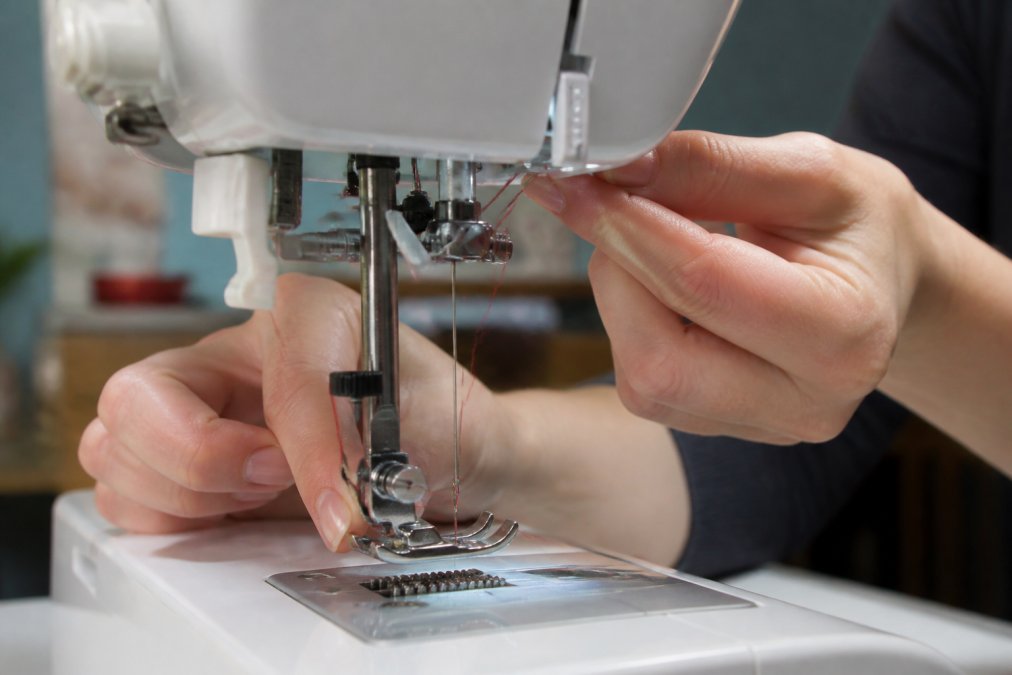
The correct threading sequence for a brother sewing machine follows this order: raise the presser foot, place thread on the spool pin, guide the thread through the upper tension guide, thread through the tension discs, continue through the lower guides, and finally through the needle from front to back. The presser foot must be raised during threading, this opens the tension discs and allows thread to sit properly between them. If you thread with the presser foot down, the thread won't be held correctly, and your tension will be inconsistent.
Thread slowly and guide the thread through each guide point carefully. The thread should sit snugly in the tension discs without forcing it. Brother machines require threading from front to back; threading from the side will cause the needle to skip stitches or break. After threading, always test your setup with scrap fabric before starting your actual project. Run a few stitches and check that the tension appears balanced, the top and bottom threads should lock together in the middle of the fabric, not bunch on either side.
For brother sewing machine models with automatic needle threaders, position the thread correctly on the spool and through the guides, then activate the threader. However, automatic threaders can fail if the thread isn't positioned correctly beforehand, so don't skip the manual steps.
Brother Sewing Machine Troubleshooting: Common Issues and Solutions
Most problems with a brother sewing machine fall into a predictable set of categories: tension problems, needle breaks, thread bunching, and skipped stitches. Understanding what causes each one is the fastest path to a fix.
Skipped stitches are usually caused by incorrect threading or a bent needle. Start by rethreading the machine completely. If skipped stitches continue, replace the needle, a needle that looks straight can still be slightly bent and cause stitches to be missed. Always use the correct needle size and type for your fabric.
Tension problems manifest as loose loops on the underside of your fabric or bunching on top. Before adjusting the tension dial, rethread the machine first, many tension complaints are actually threading errors. If tension is still unbalanced after rethreading, make small adjustments and test on scrap fabric. Document which tension setting works for each fabric weight you use regularly.
Thread breaking usually indicates a burr on the needle, incorrect needle insertion, or tension that's too tight. Inspect the needle carefully for damage and replace it if necessary. Check that the needle is inserted fully and correctly. If the needle and threading are correct, gradually loosen the tension dial until the thread stops breaking.
The bobbin area is a common source of overlooked problems. Lint and thread fragments accumulate around the bobbin case and feed dogs, causing tension inconsistencies, thread breaks, and needle damage. Clean the bobbin area regularly with a small brush, this five-minute preventative task prevents hours of troubleshooting. Ensure your bobbin is wound correctly and fully inserted.
If your brother sewing machine makes unusual noises, the issue is usually mechanical. A grinding sound often indicates lint caught in the feed dogs or a bobbin area that needs cleaning. A clicking sound can mean the needle is hitting the presser foot or bobbin case, which happens if the needle is inserted incorrectly or bent. Stop immediately and inspect.
Brother Sewing Machine Maintenance Tips for Longevity
Regular maintenance on a brother sewing machine is the difference between equipment that lasts five years and equipment that lasts fifteen. Most maintenance tasks take just a few minutes and require no specialist knowledge.
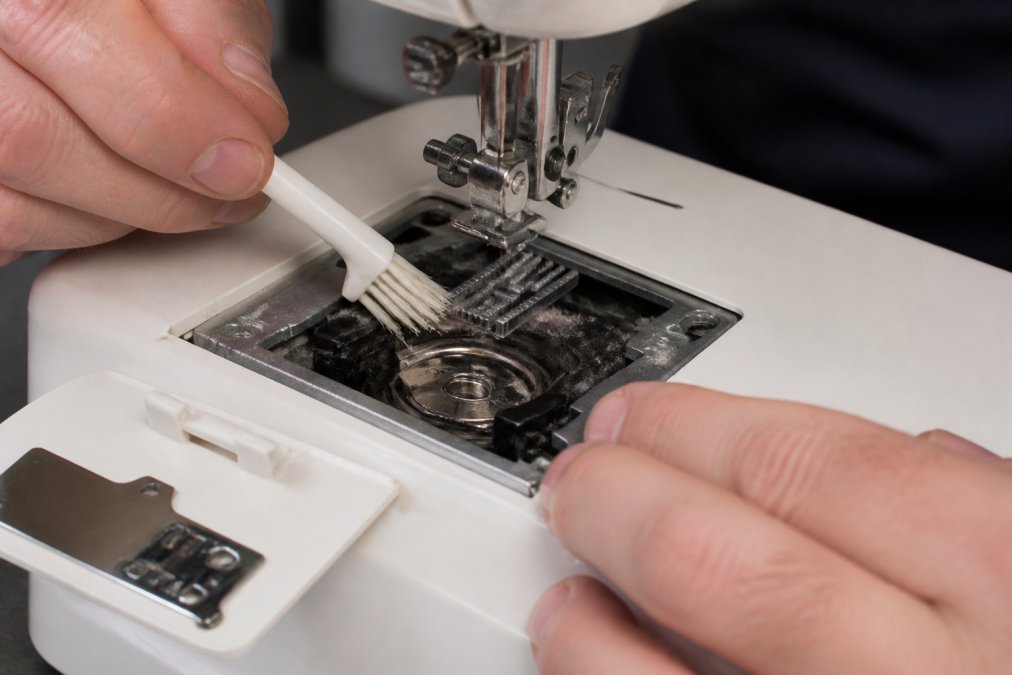
Clean your brother sewing machine after every significant project or at least every 40 hours of use (brother.com). Use a small brush to remove lint from the bobbin area, feed dogs, and around the needle. This is the single most important maintenance task, lint build-up causes tension problems, thread breaks, and can eventually damage the feed mechanism.
Oil your machine according to the manufacturer's guidance in your manual. Most Brother models require oil at specific points around the needle bar and feed mechanism. Use only the oil recommended by Brother; household oils are too thick and will gum up your machine (brother.com). Apply oil sparingly; excess oil attracts lint.
Replace needles regularly, not just when they break. A needle that's been in use for several projects may have microscopic damage that causes stitching problems. For production environments, replace needles weekly or every 40 hours of use (peer-reviewed research). For occasional users, replace them every few months.
Check the presser foot pressure occasionally. Over time, the presser foot spring can weaken, causing inconsistent fabric feeding. If your fabric isn't feeding evenly, adjust the pressure dial slightly and test.
Inspect the feed dogs for wear. If they're worn flat, they won't grip properly and fabric will slip. Feed dogs can't be sharpened and require replacement if worn.
Store your brother sewing machine in a clean, dry location away from dust and humidity. Cover it when not in use. Moisture can cause rust and damage electrical connections.
Choosing the Right Brother Model for Your Sewing Projects
Selecting the right brother sewing machine depends on your project volume, fabric types, and desired features. Understanding your actual needs prevents overspending on features you won't use and underbuying on capability you'll regret.
For production environments running high volumes of simple straight stitching, a mechanical brother sewing machine is often the best choice. These machines are durable, require minimal maintenance, and have fewer components that can fail. They excel at apparel production, where speed and consistency matter more than stitch variety.
If your work involves decorative stitching or varied stitch patterns, a computerised Brother model offers flexibility without overwhelming complexity. These machines have built-in stitch patterns and can adjust tension automatically for different stitches. For businesses that need pattern variety, the investment pays for itself in efficiency and reduced setup time.
Consider your fabric range. If you regularly work with heavy fabrics like denim, canvas, or upholstery material, you need a machine with a stronger motor and heavier-duty components. If you use speciality threads like metallic or decorative threads, choose a model with a larger needle and better thread guides.
For facilities running multiple machines, standardising on one or two Brother models simplifies spare parts inventory and operator training.
Where to Find Spare Parts and Support
Finding genuine spare parts for your brother sewing machine quickly is essential when downtime costs you money. Brother parts are widely available across the UK through authorised dealers, online retailers, and specialist sewing machine suppliers.
Common replacement parts include needles, bobbins, presser feet, feed dogs, and tension discs. Needles and bobbins are consumables you'll replace regularly and can source easily from any sewing supply shop. Presser feet come in different styles for different tasks. When ordering a presser foot, specify your exact machine model to ensure compatibility.
Feed dogs and tension discs are internal components that require more skill to replace. For production facilities, having a technician handle internal repairs often makes sense because the downtime cost of getting it wrong exceeds the service charge.
When ordering parts online, always verify the part number matches your specific machine model. Check your machine's manual or the model number plate for accurate identification.
For technical support, Brother offers a helpline and online resources. Their website includes downloadable manuals for most models. Local authorised dealers can often provide same-week service for common issues.
Choosing and maintaining a brother sewing machine doesn't require specialist knowledge, it requires consistency and attention to detail. Threading correctly, cleaning regularly, and addressing small problems before they become large ones will keep your equipment running smoothly for years. When you do need support, spare parts are readily available across the UK, and the troubleshooting principles are straightforward enough for any operator to master.
For production facilities relying on multiple types of equipment, Laserprints provides expert repair, maintenance, and spare parts for professional-grade laser, DTF, and UV print engines. We understand the cost of downtime and the importance of rapid response. Whether you're managing sewing machines or industrial printing equipment, the same principle applies: preventative maintenance and reliable support keep your business moving. Get started with Laserprints for equipment maintenance and spare parts support and discover how expert care can elevate your operational performance.
| Maintenance Task | Frequency | Time Required | Impact |
|---|---|---|---|
| Clean bobbin area and feed dogs | After every project or every 40 hours | 5 minutes | Prevents tension issues and thread breaks |
| Replace needle | Every few months (weekly in production) | 2 minutes | Eliminates skipped stitches and needle damage |
| Oil machine | Per manufacturer guidance (typically monthly) | 3 minutes | Maintains smooth mechanical operation |
| Check presser foot pressure | Every few months or as needed | 2 minutes | Ensures consistent fabric feeding |
| Inspect feed dogs for wear | Every 6 months | 3 minutes | Catches wear before it damages other parts |
Frequently Asked Questions
Are Brother sewing machines suitable for beginners?
Yes, many Brother models are designed with beginners in mind. Entry-level Brother machines feature automatic needle threaders, built-in stitches, and straightforward controls that reduce the learning curve. Models like the Brother CS6000i include preset stitch patterns and an LCD screen for easy selection, making them ideal for those starting their sewing journey.
How often should I perform maintenance on my Brother sewing machine?
Regular maintenance keeps your Brother sewing machine running smoothly. Clean the bobbin area and feed dogs after every project using a small brush to remove lint and thread scraps. Oil the machine according to your manual's instructions, typically every 8-10 hours of sewing. Have the machine serviced professionally annually or if you notice tension issues, skipped stitches, or unusual sounds.
What should I do if my Brother sewing machine skips stitches?
Skipped stitches usually result from threading errors, a bent needle, or incorrect needle insertion. First, rethread your Brother machine completely, ensuring the presser foot is raised so the tension discs open properly. Replace the needle with a fresh one, making sure it's inserted correctly with the flat side facing the right direction for your model. Check that you're using the correct needle type for your fabric weight.
Where can I get spare parts for my Brother sewing machine?
Spare parts for Brother machines are widely available through authorised dealers, online retailers, and the manufacturer. Common replacement parts include needles, bobbins, presser feet, and feed dogs. When ordering, have your machine's model number ready. For genuine parts and expert guidance on what you need, contact an authorised Brother service centre or a specialist supplier who stocks Brother accessories and components.
This article was written using GrandRanker