

Table of Contents
- 1. Establish a Consistent UV Printer Maintenance Schedule
- 2. Monitor and Clean Printheads Regularly
- 3. Address Troubleshooting UV Printhead Clogs Before They Escalate
- 4. Stock Critical UV Printer Spare Parts Replacement Components
- 5. Control Environmental Conditions in Your Print Facility
- 6. Train Your Team on Proper Equipment Operation
- 7. Use Preventative Support Services to Prevent UV Printer Downtime
- Conclusion
- Frequently Asked Questions
Last Updated: 4 September 2026
Unplanned downtime is the silent killer of profit in commercial printing. Every hour a UV printer sits idle is a missed deadline, a frustrated client, and a direct hit to your bottom line. While reactive repairs have their place, the real financial wins come from a structured approach to prevent UV printer downtime before it ever starts. At Laserprints, we’ve seen firsthand how small, consistent habits keep print engines running through peak production cycles. This guide outlines seven actionable strategies to protect your operation from the costly interruptions that plague the industry.
The core principle is simple: unplanned stops are rarely a sudden failure; they are almost always the result of neglected maintenance, worn consumables, or environmental factors that were ignored until they became critical. Below, we’ll show you exactly how to build a defence-in-depth strategy covering hardware, environment, and team skills. We’ll explore the specific routines that matter most and how to structure them for maximum efficiency.
1. Establish a Consistent UV Printer Maintenance Schedule
A documented maintenance schedule is the foundation of any reliable production environment. This isn't about vague advice to "clean things regularly"; it requires a defined calendar of daily, weekly, and monthly tasks tailored to your specific machine and workload. A structured approach ensures that critical checks are never missed during busy periods.
Your daily routine should include a visual inspection of the printheads, a nozzle check, and confirming the capping station is clear of debris. Weekly, you should inspect the ink dampers for signs of wear or air ingress and check the wiper blade for ink buildup. Monthly tasks might involve cleaning the encoder strip and checking all cable connections for security.
2. Monitor and Clean Printheads Regularly
Printheads are the most critical and expensive component in a UV printer, and their condition directly dictates output quality. Proactive monitoring involves more than just running a test print when you notice banding. You should be regularly performing nozzle checks and comparing them against a known baseline to catch degradation early.
When performance dips, a simple cleaning cycle often resolves minor issues. For persistent problems, a more hands-on approach is needed. Many operators find that a UV printer maintenance schedule which includes a weekly manual wipe-down of the printhead face prevents ink from curing and crusting on the nozzle plate.
3. Address Troubleshooting UV Printhead Clogs Before They Escalate
The moment you see missing nozzles or fine lines in your print, you are in a race against time. Troubleshooting UV printhead clogs requires immediate and decisive action. The longer a clog is left, the harder it is to clear, as UV ink cures and bonds to the internal channels.
Start by running the printer's built-in cleaning cycle once or twice. If that doesn't resolve the issue, the problem may be with the cap top seal, which is responsible for keeping the printhead moist when parked. A worn or poorly sealing cap top can allow air to reach the nozzles, accelerating ink drying.

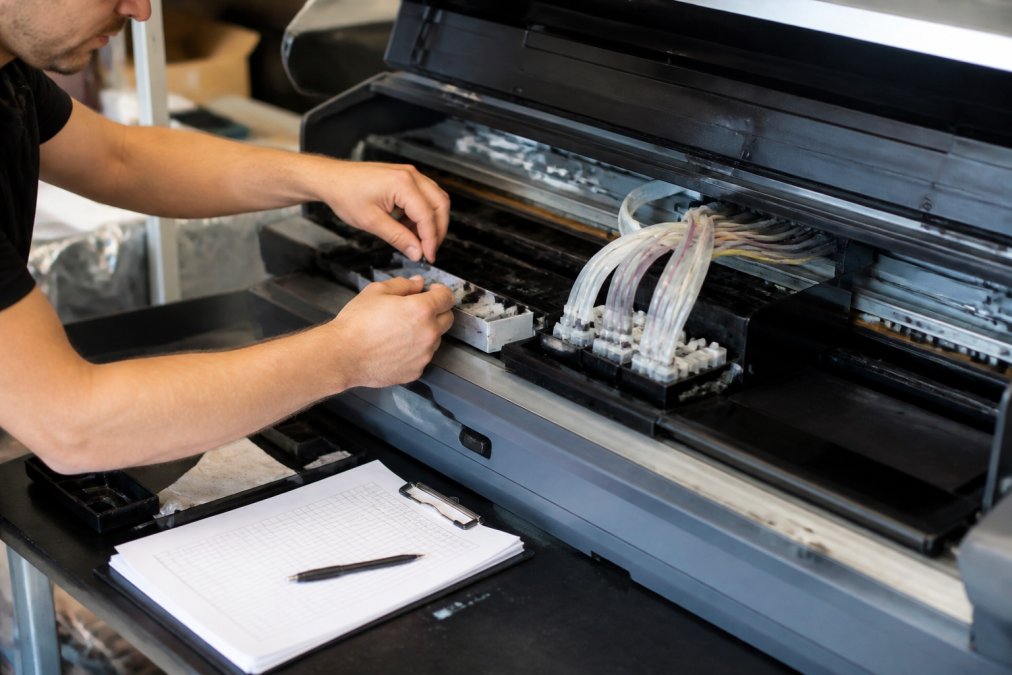
A common mistake is to repeatedly run cleaning cycles, which wastes ink and can flood the capping station. If two or three cycles fail to restore full nozzle function, stop and investigate further. Check the I3200 Printhead Cap Top Seal or the XP600 Printhead Cap Top Seal for damage or wear. If the seal is compromised, replacing this inexpensive part can prevent a much larger issue. If the problem persists, the printhead itself may need professional attention.
4. Stock Critical UV Printer Spare Parts Replacement Components
Waiting days for a replacement part is a major source of extended downtime. To prevent UV printer downtime, you must identify the components most likely to fail and keep them in stock. This transforms a potential multi-day stoppage into a short maintenance window.
Critical spares generally fall into two categories: consumables and wear items. Consumables include items like cap top seals and wiper blades, which degrade with normal use. Wear items include ink dampers, which regulate ink flow and filter contaminants before they reach the printhead.
| Component | Function | Sign of Failure | Impact of Neglect |
|---|---|---|---|
| Cap Top Seal | Seals printhead when parked | Poor suction, missing nozzles | Printhead drying and clogging |
| Ink Damper | Regulates ink flow and filters | Ink starvation, air bubbles | Inconsistent prints, nozzle damage |
| Wiper Blade | Cleans printhead face | Streaks, ink buildup | Printhead contamination |
A good rule of thumb is to keep at least one of each critical consumable on your shelf. For example, stocking a XP600 UV Ink Damper or a I3200 XP600 UV Ink Damper ensures you can address ink flow issues immediately without waiting for a delivery.
5. Control Environmental Conditions in Your Print Facility
The environment where your UV printer operates has a significant impact on its reliability. UV inks are sensitive to temperature and humidity. Cold environments cause ink to become viscous, leading to poor flow and clogged nozzles (peer-reviewed research). High humidity can cause issues with ink adhesion and curing.
Maintaining a stable, controlled environment is a critical part of a UV printer maintenance schedule. Most manufacturers recommend operating temperatures between 20°C and 25°C, with relative humidity between 40% and 60% (iso.org). Fluctuations outside this range can cause a host of print quality issues that are often misdiagnosed as hardware failures.
Direct sunlight and airflow from doors or air conditioning units should also be avoided, as they can cause rapid temperature changes at the printhead. Investing in a simple thermometer and hygrometer for your print room is a low-cost way to monitor conditions and prevent environmental-related downtime.
6. Train Your Team on Proper Equipment Operation
Your operators are the first line of defence against downtime. Even the best maintenance schedule fails if the team using the equipment doesn't understand the basics of correct operation and daily care. Investing time in training pays dividends in reduced errors and longer machine life.
Training should cover more than just how to send a print job. It must include correct start-up and shut-down procedures, which are vital for preventing ink from drying in the nozzles. Operators should also know how to interpret nozzle checks, perform routine cleaning, and, crucially, identify the warning signs of a developing issue before it becomes a breakdown.
This is where preventative support becomes valuable. A common mistake is to have a "designated expert" who is the only person who knows how to maintain the machine. When that person is absent, problems go unnoticed. By training multiple staff members and documenting procedures, you create a resilient operation that can maintain production regardless of who is on shift.
7. Use Preventative Support Services to Prevent UV Printer Downtime
Even with a diligent in-house team, there will be times when you need expert assistance. Relying solely on reactive, break-fix calls is the most expensive way to manage your equipment. A proactive partnership with a specialist service provider can help prevent UV printer downtime by catching potential faults before they cause a stop.
These services can include scheduled on-site inspections, where an engineer tests components and identifies wear that isn't yet visible. For software or configuration issues, a Remote Support Service can resolve problems in real time without the cost or wait of a site visit, getting you back up and running in minutes rather than days.

For more significant mechanical faults, having a relationship with a provider that offers a Call-Out Service ensures a qualified engineer can be on-site to diagnose and fix the problem quickly. This is in stark contrast to waiting for a third-party technician who may not be familiar with your specific print engine. The goal is to shift your mindset from "fixing breakdowns" to "managing reliability."

Conclusion
Keeping your UV printer in production is not a matter of luck; it is a direct result of a disciplined operational strategy. By implementing a structured maintenance schedule, helping your team with training, and partnering with a specialist for expert support, you can significantly reduce the frequency and impact of unplanned stoppages. This proactive approach protects your profit margins and ensures you can consistently meet your customers' expectations.
Every strategy discussed here, from monitoring printheads to stocking critical spares, is designed to build resilience into your operation. The true cost of downtime is not just the repair bill, but the lost orders and damaged reputation that follow. At Laserprints, we specialise in keeping UK businesses running, offering expert repair, maintenance, and high-quality spare parts for professional-grade laser, DTF, and UV print engines. Our dedicated team provides the precise care and rapid support needed to maintain uninterrupted production schedules.
Don't wait for the next breakdown to take action. Get started with Laserprints and ensure your equipment operates at peak performance, keeping your production lines moving and your business thriving. Shop now →
Frequently Asked Questions
How often should I perform maintenance on a UV printer?
Most UV printers benefit from daily nozzle checks and weekly printhead cleaning cycles as part of routine operation. A formal UV printer maintenance schedule should include monthly deep cleaning, quarterly ink system inspections, and annual professional servicing. High-volume production environments may need more frequent attention. Laserprints' Printhead Cleaning Service (£49.99) can handle deep maintenance when in-house cleaning isn't sufficient.
What causes UV printer printhead clogging?
Printhead clogs develop when UV ink dries within nozzle channels, air enters the ink system, or contaminants accumulate in the delivery lines. Inconsistent use, poor environmental control, and worn capping seals all accelerate clogging. Replacing worn cap top seals (from £8.32 for XP600 models) and maintaining proper humidity levels prevents most clogs. If clogging persists despite routine cleaning, the I3200 XP600 UV Ink Damper (£12.49) can improve ink flow consistency and reduce air entry.
What are the most common reasons for UV printer downtime?
The leading causes are printhead failures, ink delivery system blockages, worn maintenance components, and software configuration issues. Preventative maintenance addressing these areas can significantly reduce unexpected breakdowns. For rapid diagnosis of software-related issues without site visits, Laserprints' Remote Support Service (£24.99) provides expert guidance via secure video connection. For mechanical faults requiring hands-on repair, the Call-Out Service (£125.00) dispatches a qualified engineer to your facility.
How does humidity affect UV printer performance?
Low humidity (below 40%) causes UV ink to evaporate faster, leading to nozzle drying and clogs. High humidity (above 60%) promotes ink contamination and electrical component corrosion. Maintaining 45-55% relative humidity is ideal for UV printer reliability. Monitor humidity levels daily, use dehumidifiers or humidifiers as needed, and ensure proper air circulation around the machine. Environmental control is one of the simplest yet most effective ways to prevent UV printer downtime.
This article was written using GrandRanker