

Table of Contents
- Why Preventative Maintenance for UV Print Engines Pays for Itself
- UV Printer Maintenance Schedule: Daily, Weekly and Monthly Tasks
- UV Printer Maintenance Checklist for Production Managers
- UV Printer Printhead Cleaning: Doing It Without Causing Damage
- UV Printer Safe Shutdown Procedure for Nights and Weekends
- Curing, Ink and Environmental Factors That Affect UV Print Engines
- When to Call a Professional for UV Print Engine Servicing
- Conclusion: Building Maintenance Into Your Production Routine
- Frequently Asked Questions
Last Updated: 14 October 2026
Why Preventative Maintenance for UV Print Engines Pays for Itself
Preventative maintenance for UV print engines is the scheduled inspection, cleaning and replacement of wear parts before they fail, rather than repairing the machine after it stops.
The logic is straightforward. A cap top seal that no longer seats properly is one of the most common early warning signs, and it costs far less to swap than a printhead does.

That is the core argument of this guide: maintenance is not a cost centre, it is the cheapest insurance your production schedule has. Below, we break down exactly what to check daily, weekly and monthly, how to clean a printhead without wrecking it, and when a job genuinely needs an engineer rather than a swab.
UV Printer Maintenance Schedule: Daily, Weekly and Monthly Tasks
A UV printer maintenance schedule works best when it is split by frequency rather than by machine part. Daily tasks protect the nozzles overnight, weekly tasks catch wear before it spreads, and monthly tasks address the systems that degrade slowly. Splitting it this way means an operator can complete the daily list in minutes at shift change, without needing an engineer on site.
Daily Tasks Before and After Each Shift
Before the first job, run a nozzle check and confirm the capping station is clean and dry. Wipe the carriage rail and check that the printhead parks correctly. After the last job, perform a full clean cycle, confirm the cap top seals against the head, and top up or check ink levels so the machine does not sit with a dry line overnight.
- Run a nozzle check pattern before the first print
- Inspect the capping station for ink pooling or debris
- Wipe the carriage rail and check for smooth travel
- Confirm the printhead parks and caps correctly
- Run the end-of-shift clean cycle
- Check ink levels and record any drop in consumption
Weekly and Monthly Checks
Weekly, inspect dampers for air bubbles or discolouration, check wiper blades for wear, and clean the encoder strip with a lint-free cloth. Monthly, inspect ink lines for sediment, check the UV lamp or LED array output, verify the chiller or cooling system, and test the emergency stop and interlocks. Record every check, because a maintenance log is what turns a guess into a diagnosis when something does go wrong.

| Frequency | Task | Why It Matters |
|---|---|---|
| Daily | Nozzle check, cap inspection, clean cycle | Prevents overnight nozzle drying |
| Weekly | Damper and wiper inspection, encoder strip clean | Catches ink starvation and position errors |
| Monthly | Ink line, lamp output, cooling system check | Addresses slow-degrading systems |
| Quarterly | Engineer service, wear part replacement | Prevents failures the operator cannot see |
UV Printer Maintenance Checklist for Production Managers
A UV printer maintenance checklist is only useful if it is short enough that operators actually complete it. The version we recommend to production managers covers the parts that fail most often, in the order they should be checked. Assign ownership for each line, because an unassigned checklist is a checklist nobody does.
- Nozzle check passed and logged
- Cap top inspected for cracking, hardening or poor seal
- Dampers checked for air ingress and ink discolouration
- Wiper blade and capping station cleaned
- Ink filters and lines checked for sediment
- UV lamp or LED output verified against baseline
- Chiller coolant level and temperature checked
- Encoder strip and rail cleaned
- Waste ink container emptied and logged
- Fault log reviewed for recurring errors
UV Printer Printhead Cleaning: Doing It Without Causing Damage
UV printer printhead cleaning causes more damage through over-cleaning than through neglect. The nozzle plate is delicate, and aggressive wiping or repeated powerful flush cycles wear it down faster than normal production does.
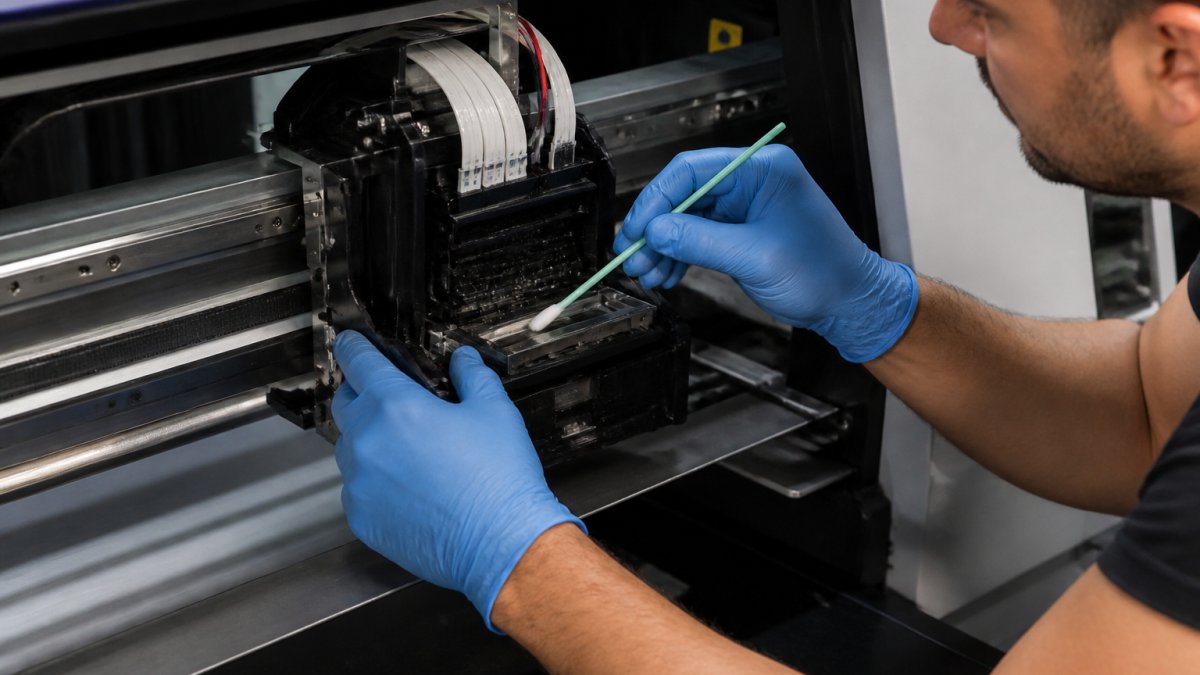
Start with the gentlest option: a standard clean cycle, then a nozzle check. If that clears it, stop. Escalate to a manual clean only if the pattern is still missing nozzles, and use a lint-free swab dampened, not soaked, with the correct fluid. Work along the plate in one direction rather than scrubbing back and forth.
When to Replace Cap Tops and Dampers
Replace the cap top when it hardens, cracks or stops sealing cleanly against the head, and replace dampers when you see air bubbles, discolouration or inconsistent ink flow. These are inexpensive parts, and replacing them on a schedule is far cheaper than the printhead damage a failed seal causes. We stock I3200 printhead cap top seals in portrait and landscape fittings at £14.99, an XP600 printhead cap top seal at £8.32, and an XP600 UV ink damper at £12.49, so a worn seal does not have to become a week of downtime.
UV Printer Safe Shutdown Procedure for Nights and Weekends
A UV printer safe shutdown procedure exists to stop ink drying in the nozzles while the machine sits idle. The sequence matters: clean first, cap second, power down last. Skipping the clean cycle before a weekend is one of the most common causes of Monday morning nozzle loss, because uncured ink left on the plate hardens in place.
- Finish the current job and let the carriage return to the home position.
- Run a full clean cycle, then a nozzle check to confirm the head is clear.
- Confirm the cap top seals correctly against the printhead.
- Check ink levels and top up if the machine will sit for more than a day.
- Close the software, then power down in the manufacturer's sequence.
- Cover the machine to keep dust off the carriage and capping station.
For longer shutdowns, such as a holiday period, flush the lines with the correct cleaning fluid and follow the manufacturer's storage guidance. UV ink left static in a line for weeks can sediment and block the damper, which turns a short break into a full ink system clean.
Curing, Ink and Environmental Factors That Affect UV Print Engines
Temperature, humidity and UV lamp condition affect print quality as much as mechanical wear does. UV ink cures when it passes under the lamp, so a lamp or LED array that has lost output will leave prints tacky or undercured even when the printhead is perfect. This is why a monthly lamp check belongs on the schedule alongside the mechanical checks.
I3200 Printhead Cap Top Seal Portrait Fitting →
Humidity matters too. Very dry air encourages static, which pulls dust onto the nozzle plate and into the ink path, while very humid air can affect how the ink behaves on the substrate. Keep the press area within the range the manufacturer specifies, and check the chiller or cooling system monthly, because an overheating lamp degrades faster and cures less consistently.
When to Call a Professional for UV Print Engine Servicing
Call a professional when a fault recurs after two or three clean cycles, when the machine reports a printhead or capping error you cannot clear, or when you see physical damage to the nozzle plate or carriage. These are the points where continuing to work on the machine yourself tends to make things worse, not better.
We have seen this pattern repeatedly. An operator tries to save a callout fee, over-cleans the head, and turns a blocked nozzle into a printhead replacement. The parts are rarely the expensive part of that story; the lost production is.
At Laserprints, we service laser, DTF and UV print engines, supply the spare parts that fail most often, and provide remote support when a fault can be resolved without a site visit.
Conclusion: Building Maintenance Into Your Production Routine
The presses that stay productive are not the ones with the newest engines. They are the ones where maintenance is a scheduled part of the week, not a reaction to a breakdown. Daily checks, weekly inspections and monthly system checks take minutes, and they are what keep a UV print engine running through the jobs that pay for it.
If your current routine is closer to reactive repair, start with the daily list and build from there. When a fault needs more than a clean cycle, or when you need the right cap top or damper without waiting on a slow supply chain, Laserprints can help. We offer expert repair and servicing, genuine spare parts and remote support, with quick response times built around keeping your production running.
Frequently Asked Questions
How often should a UV print engine be maintained?
Daily maintenance covers printhead wiping, capping station checks and nozzle test prints at the start and end of each shift. Weekly tasks include cleaning the capping station, checking ink dampers and inspecting wiper blades. Monthly maintenance covers filters, UV lamp reflectors, belt tension and a full printhead cleaning cycle. A professional service is usually recommended every six to twelve months depending on production volume and how many shifts the machine runs.
What daily maintenance does a UV printer need?
A daily routine should include a nozzle check print before production starts, wiping the printhead surface with a lint-free swab and the manufacturer's approved cleaning fluid, checking that the cap top forms a clean seal when the carriage parks, and confirming ink levels in each channel. At the end of the shift, run the printer's own cleaning cycle and park the carriage correctly so the printhead sits on a sealed cap top rather than exposed to air.
How do you prevent UV printer printheads from clogging?
The main causes of clogging are dried ink on the nozzle plate, a worn cap top that fails to seal, and air entering the ink system through a damaged damper. Replace cap tops when they harden or stop sealing; the I3200 Printhead Cap Top Seal costs £14.99 and the XP600 version costs £8.32. Replace UV ink dampers such as the XP600 UV Ink Damper at £12.49 if you see inconsistent flow or air bubbles. Daily nozzle checks catch partial clogs before they become permanent.
What should be included in a UV printer maintenance checklist?
A working checklist covers five areas: printhead care (nozzle checks, wiping, capping), ink system (damper inspection, ink levels, filter changes), mechanical parts (belt tension, rail lubrication, wiper blades), UV curing (lamp output, reflector cleaning, shutter operation) and environment (temperature, humidity, dust). Add the date, the engineer's initials and any parts replaced so you build a service history that supports warranty claims and resale value.
How should a UV printer be maintained when it is not in use?
For short breaks, leave the carriage parked on a clean, sealed cap top and run a daily cleaning cycle. For shutdowns longer than a week, flush the ink lines with the manufacturer's approved cleaning fluid, cap the printheads, and store the machine in a dust-free area within the recommended temperature and humidity range. Leaving UV ink sitting in an uncapped printhead for days is one of the most common causes of permanent nozzle loss.
When should a UV print engine be serviced by a professional?
Call a professional when a nozzle check shows missing channels that do not recover after two or three cleaning cycles, when print quality drops across the whole bed rather than one area, when the machine reports ink system or capping errors, or when you hear unusual noises from the carriage or belt. Routine servicing every six to twelve months catches wear on cap tops, dampers and wipers before it turns into a printhead replacement.
Downtime is the real cost in UV printing, and most of it is avoidable. Laserprints keeps laser, DTF and UV print engines running with expert repair and servicing, genuine spare parts and remote support. Get started with Laserprints and protect the production hours your business depends on.